
Скачать SQLite Viewer Editor – Бесплатный инструмент для работы с базами данных для Windows, Mac, Android и iOS
Ищете надёжный, лёгкий и бесплатный инструмент для управления вашими SQLite‑базами данных? SQLite Viewer Editor — мощное, удобное в использовании программное обеспечение, разработанное для разработчиков, тестировщиков и энтузиастов баз данных, которым нужен быстрый доступ к файлам SQLite. Независимо от того, работаете ли вы над Android‑приложениями, настольными программами или встроенными системами, этот инструмент упрощает процесс просмотра, редактирования и управления SQLite‑базами без необходимости глубоких знаний SQL. Поддержка множества платформ, включая Windows, Mac, Android и iOS, обеспечивает бесшовное взаимодействие с базой данных на разных устройствах. Интуитивный интерфейс позволяет пользователям просматривать таблицы, изменять записи, добавлять или удалять поля и экспортировать данные без усилий. Приложение полностью бесплатно для загрузки и использования, что делает его отличным выбором как для новичков, так и для продвинутых пользователей. Регулярные обновления гарантируют совместимость с последними версиями SQLite и повышенные функции безопасности. Будь то отладка приложения, извлечение данных с SD‑карты или простое изучение структуры базы, этот инструмент сочетает в себе производительность и простоту использования в одном компактном пакете.
Effortless Database Management with SQLite Viewer Editor
The SQLite Viewer Editor stands out as one of the most accessible tools for managing SQLite databases across different operating systems. Unlike complex database management systems that require installation and configuration, this lightweight application runs directly from your device or computer, eliminating the need for server setups or database drivers. Its clean, minimal interface is designed with usability in mind—users can open any .db or .sqlite file with just a few clicks.
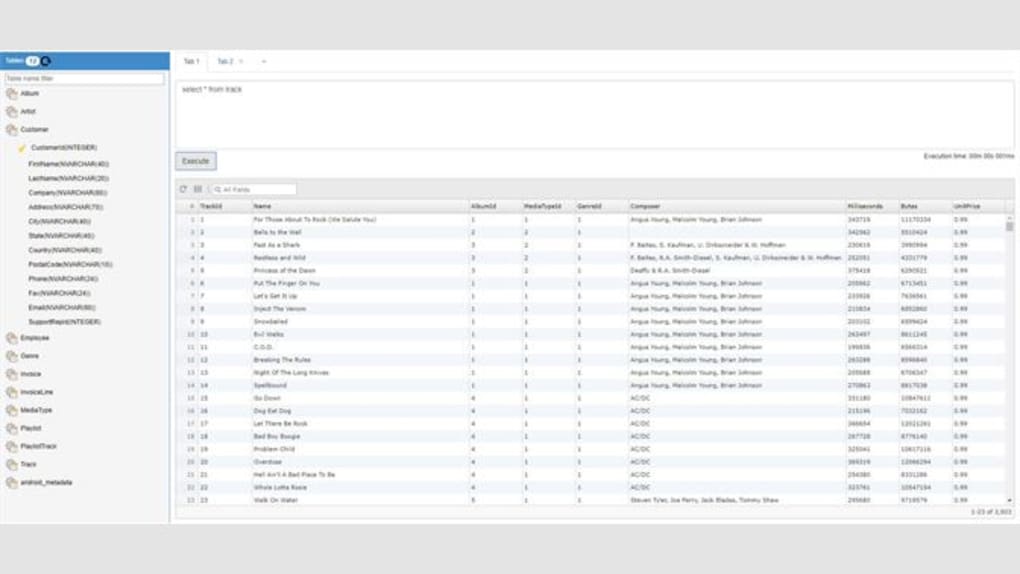
Once loaded, the app displays the database schema, including tables, views, indexes, and triggers, in a well-organized tree view. You can double-click any table to view its contents in a spreadsheet-like grid, where editing individual cells is as simple as typing. The built-in SQL editor allows advanced users to run custom queries, while beginners benefit from the visual table editor that automatically generates the necessary SQL commands behind the scenes.
One of the most valuable features is the ability to edit database structures directly. You can add new columns, rename existing ones, change data types, or even drop tables—all through a visual interface. This is particularly useful during app development when you need to test schema changes without writing complex ALTER TABLE statements.
Additionally, the tool supports data export and import, enabling users to save table data as CSV, JSON, or SQL scripts. For Android developers, this means you can extract databases from an app’s private storage or SD card, making it easy to debug or back up user data. The app also includes a search function that lets you find specific records across multiple tables, saving hours of manual scanning.
With automatic backup options and the ability to save changes directly to the original file, SQLite Viewer Editor ensures that your work is never lost.
Cross-Platform Compatibility and Easy Installation
One of the strongest advantages of the SQLite Viewer Editor is its cross-platform support. Whether you're using Windows 10/11, macOS, Android, or iOS, there’s a version available to suit your needs. The Windows and Mac versions are downloadable as standalone executables, meaning no installation is required—just unzip the file and run the app.
This makes it ideal for developers who work on multiple machines or need a portable solution. On Android, the app is available via Google Play, where it can be installed directly from the app store. For iOS users, the tool is accessible through the App Store, ensuring a smooth experience across Apple devices.
Installation is straightforward and takes less than a minute. On desktops, simply download the ZIP file, extract it, and launch the executable. No admin rights are required, which is perfect for corporate environments with restricted software policies.
The app is lightweight, consuming minimal RAM and CPU, so it runs smoothly even on older systems. For mobile users, the app integrates seamlessly with the device’s file system, allowing you to browse internal storage, SD cards, or cloud folders like Google Drive and iCloud. You can open database files directly from your app’s data directory (on Android) or from backup folders (on iOS).
The interface adapts to different screen sizes, offering a responsive design on both tablets and smartphones. Regular updates ensure that the app stays compatible with the latest OS versions and security patches, so you can trust it to handle sensitive data securely.
Pros, Cons, and Frequently Asked Questions
- Pros:
- Free to download and use with no hidden fees
- Lightweight and fast, even on low-end devices
- Supports all major platforms: Windows, Mac, Android, iOS
- Intuitive interface with drag-and-drop functionality
- Full editing capabilities for tables, fields, and indexes
- Export data to CSV, JSON, and SQL formats
- Search and filter records across multiple tables
- Automatic backup and save options
- Regular updates and strong community support
- Cons:
- No built-in SQL syntax highlighting (for advanced users)
- Limited support for very large databases (over 1GB)
- Mobile version lacks some advanced features available on desktop
- No real-time collaboration or version control
- Basic user authentication (no password protection for files)
Frequently Asked Questions (FAQ)
- Is SQLite Viewer Editor free to use?
- Yes, the SQLite Viewer Editor is completely free to download and use. There are no premium features locked behind a paywall, and no trial periods. The developers offer the app as a free tool to support the developer community.
- Can I edit SQLite databases on my Android phone?
- Absolutely. The Android version of SQLite Viewer Editor allows you to open, view, and edit SQLite databases directly from your device. You can access databases stored in app folders or on your SD card, making it ideal for on-the-go debugging.
- Does it support large database files?
- The app works well with most standard SQLite databases. However, for files larger than 1GB, performance may degrade slightly due to memory limitations. For very large datasets, consider using a more robust tool like DB Browser for SQLite.
- How do I export data from SQLite Viewer Editor?
- You can export individual tables or entire databases to CSV, JSON, or SQL format. Simply right-click a table, select “Export,” and choose your preferred format. The exported file can be saved to your device or shared via email or cloud services.
- Is my data secure when using this app?
- Yes, the app does not transmit your data to any external servers. All operations are performed locally on your device. However, for sensitive data, it’s recommended to use file encryption or store databases in secure locations.
Final Verdict: A Must-Have Tool for Developers and Data Enthusiasts
The SQLite Viewer Editor is a standout choice for anyone working with SQLite databases. Its combination of simplicity, cross-platform availability, and powerful editing features makes it a go-to tool for developers, QA testers, and hobbyists alike. Whether you're debugging an Android app, managing a local database for a desktop application, or exploring a database file you’ve extracted from a backup, this software delivers consistent performance and reliability. While it lacks some advanced features found in enterprise-grade tools, its free nature and ease of use more than compensate for these limitations.
With regular updates, strong community feedback, and a commitment to security, the SQLite Viewer Editor continues to evolve. It’s a perfect example of how a well-designed, lightweight tool can solve real-world problems without unnecessary complexity. If you’re looking for a secure, free, and easy-to-use database editor for Windows, Mac, Android, or iOS, this is the tool you should download today. Don’t miss out on the opportunity to streamline your database workflow—get started now and experience the power of intuitive database management.
Download SQLite Viewer Editor today and take full control of your SQLite databases—no strings attached, no cost, just pure functionality.







